Is this website safe or legit? I’ve asked myself that question many times while shopping online, and I bet you have too.
My name is Zouhair, and I’m the owner of CouponFYI. I’ve spent my time testing stores, checking real checkout pages, and making real purchases. I’ve seen what looks trustworthy right away and what makes me stop and think twice.
So look, let’s be real for a second. Clicking that “Buy Now” button in 2026 can feel a little scary sometimes. On one hand, shopping online has never been this easy. You can now get stuff at your door in one or two days. Even current smart tools help you find deals in seconds. Pretty amazing, right?
Well, here’s the flip side: the same tools that help you shop also help scammers. They use this technology to improve their tactics and build fake online stores that look surprisingly real. It is the same tool, but used for two completely different reasons.
⚡ Quick Verdict (TL;DR)
Is online shopping safe? Yes, most of the time. The FTC, which is the U.S. government’s own consumer protection agency, says Americans reported losing $15.9 billion to fraud in 2025. The highest number ever recorded. And their latest 2024 report shows that online shopping scams were the second most common type of fraud. The most common scam was people pretending to be someone else.
Here’s the quick list:
- ✅ Big, well-known stores are usually safe, especially with the right payment method
- ✅ Real stores show real contact info, clear return and refund policies, and normal payment options
- ⚠️ Fake stores are built to look exactly like real ones
- ⚠️ Debit cards give you way weaker protection than credit cards
- ⚠️ The “secret coupon code” trap can send shoppers to fake checkout pages
If you’ve ever found shoes at 80% off on a site you’ve never heard of and start wondering, “wait, is this legit?” just listen to that little voice in your head. It’s usually right.
I run this coupon website, so I spend a lot of my time testing and writing real reviews of stores and service providers. I wrote real reviews of Fiverr, Alibaba, AliExpress, DHgate, Temu, Expedia, Newegg, and Onlymaker, and more. Real orders. Real screenshots. Not just guessing based on what I read somewhere. So, in this guide, I will pull together what I learned from that, plus real advice straight from the FTC, in simple and clear language.
Why Safety Isn’t the Same at Every Store
You have to understand that not every online store has the same rules.
Big stores like Amazon or Walmart have whole teams working on fraud and safety, and they’ve built that up over years, decades. Amazon was founded in 1994, and its shopping site went live to the public in July 1995, the same year eBay launched.
That’s over 30 years of handling real transactions, fixing real problems, and earning real trust.
A tiny store you found today might have none of that history behind it. But that doesn’t mean small stores are bad. If you understand it this way, you are wrong. Some of the best deals I’ve ever found came from smaller sites, but the idea here is that you must check them a bit more closely.
And how you pay is very important and matters as much as where you shop. Using a credit card on a site you’re not sure about beats using a debit card on a store you already trust. But why?
This is because credit cards come with real legal protection. Debit cards mostly don’t have that.
How to Check If a Website Is Real Before You Buy
There was old advice that said, “look for the lock icon.” Well, that’s not enough anymore today. Scammers can get that lock icon too. Here’s what actually matters.
Type the address in yourself.
This is one of the mistakes people make the most; I noticed that with people around me, my family, and my friends. Once they receive an email, they click the links from it directly and start typing their info. Nooo, don’t do that.
I don’t say you should never do that; in some cases, yes, if you receive the reset password link, for example, from a store you asked for, then do it yourself. This is just an example. However, clicking links inside random emails and typing your info is dangerous. Also, links in ads to get to a store.
Look, always type the name of the store straight into your browser. It looks simple, but it really helps. However, no single habit can catch every fake website trick. That’s why this whole checklist matters, not just one item on it.
Read the web address slowly.
Have you heard of lookalike domains before? They are also called cousin, spoofed, or doppelgänger domains. They are deceptively crafted web addresses made to look like real brands so they can trick you. Scammers love that, so they use them. Let me give you examples. For example, they might use simple spelling mistakes like goggle.com instead of google.com. Swapping look-alike letters (like using a capital I in linkedln.com). Or adding extra words (like amazonstore.com).
Sometimes the name will be true, but they change the ending from .com to .net. Or even hide a real brand name inside a long, fake web address (like yourbrand.login-secure.com).
There is a name for this phenomenon (typoglycemia), when your brain reads mixed-up words easily as long as the first and last letters are correct.
For example, netfilx.com, instead of netflix.com, at a quick glance, it looks close enough to fool you. Slow down. Read it letter by letter.
Look for real contact details
A working phone number and a real address are a good trust signal; most real stores have them. But treat this as one signal among several, not a strict pass/fail test on its own; some small, legitimate sellers run lean and only offer email support. However, if the “Contact Us” page is completely blank, that’s worth factoring in alongside everything else here.
Search the store’s name plus the word “review” or “scam”
This takes two minutes and tells you a lot. Check a site like Trustpilot, and read the bad reviews first. Bad reviews usually tell you the real story faster than the good ones do.
Read the return & Refund policy
A real store explains clearly what happens if you want your money back. If it says “no refunds, no exceptions” and nothing else, that’s a red flag.
Ask yourself if the price makes sense
The FTC advises you to compare prices at a few different stores before you buy anything. If a store sells an item for a much lower price than everywhere else, it is a big warning sign. There’s no magic percentage that proves a scam, but the bigger the gap, the more it deserves a second look.
Check how old the site is.
Use free tools like Whois.com to see when the store you are aiming to buy from was first registered. A brand-new site claiming to be a “20-year industry leader” doesn’t add up.
Buy from fewer stores when you can.
This is a small habit, but it pays off. Buy from stores you already know and trust, rather than many different websites. The fewer places that have your credit card number, the safer you will be.
A Quick Safety Checklist
Run through this before buying from any store you’re not sure about:
| Check | What you want to see |
|---|---|
| Web address | Starts with HTTPS, no weird extra words |
| Contact info | A phone number and address, as one signal among several |
| Return policy | Clear, easy to find, no “no refunds ever” |
| Payment options | Visa, Mastercard, PayPal, Apple Pay |
| Reviews | Found on an outside site, not just the store’s own page |
| Site age | Registered more than a year ago |
| Price | Close to what other stores charge |
Before we move on, it’s worth knowing that HTTPS does not mean the store itself is honest; today, scam sites use it too. It simply means that your connection to that site is locked up tight. So, it’s harder for someone to grab your info while it’s traveling there. Generally, HTTPS is a good sign to look for, not proof of anything on its own.
Warning Signs of a Scam
A countdown clock that never runs out
“Sale ends in 5:00” is built to rush you. Refresh the page. If it jumps right back to 5:00, that’s not a sale about to end; that’s just a trick to make you panic-buy.
Here is something useful to know about why making people hurry works so well on shoppers: big, real stores taught us to act fast.
Let’s see Black Friday, for example. This term actually started as a bad thing. Back in the 1950s, police in Philadelphia used it to describe the bad traffic and wild crowds the day after Thanksgiving. Later, store owners turned it into a good thing: the day stores went from losing money (“in the red”) to making a profit (“in the black”).
Cyber Monday followed in late November 2005. A woman named Ellen Davis at Shop.org (part of the National Retail Federation) came up with the name after noticing that many people were buying things online when they returned to work on Monday, where the internet was faster. Later in July 2015, Amazon added Prime Day to celebrate its 20th anniversary.
Every one of these events was built, on purpose, to create urgency around a limited window. Scammers didn’t invent that psychology; they copied it.
The coupon trap
This one matters a lot, since it’s basically my whole job.
Look, searching for a discount code before you buy is totally normal, and I want you to keep doing that. Especially around these exact shopping events.
But some fake websites and social media posts promise a “secret 70% off code” to bring you to a fake checkout page. That page is built to steal your card number. The code may not even work.
So what should you do to protect yourself? Simply, don’t trust one site blindly over another. It’s the same habit from before: always type in the real store’s address yourself. Never enter your card details on a page you landed on through some random link promising a huge, unbelievable discount.
Payment only by wire transfer, gift card, or crypto.
These payments are not completely secret. For example, crypto payments stay on a public blockchain forever. The real problem is that once you send the money, you cannot get it back. Real stores let you pay with normal credit cards or a digital wallet. If something goes wrong, these methods help you get a refund.
New Scam Tricks Worth Knowing
Fake shops on Instagram and TikTok.
Pretty photos. Clean-looking page. But the account only popped up a few weeks ago, with no real business behind it. Check how old the account is. Look for reviews somewhere other than the comments under its own posts.
Fake emails pretending to be a real brand.
This is called phishing. The email looks exactly like it came from Amazon or your bank, but it didn’t. Check the actual sender address, not just the name shown at the top. And never click a payment link inside an email. Go to the real site directly instead.
Fake package delivery texts.
You get a text. It says your package is stuck. It says you must pay a small fee to get it. This is a very common scam. The FTC, a U.S. government group, says many people report this kind of text.
A real delivery company won’t ask you to pay through a link in a text message. So treat any payment request like that as a major red flag. Check your package tracking in the store’s app or the carrier’s official site instead.
Hidden fees added at the last second.
Some sites show one nice price on the product page, then quietly tack on extra charges right before you hit confirm. Always scroll through the full order summary before you pay, especially on a store you’ve never used before.
Adware and sketchy pop-ups.
Some ads exist to trick you into clicking; then they either slow down your device or try to steal info. If a pop-up looks aggressive or shady, don’t click the X either; sometimes even that triggers something. Just close the whole tab.
The Safest Ways to Pay Online
Let’s get into the part that matters most: your money.
Turn off online payments on your bank app, then switch them back on only when you need them. This one’s honestly one of the best tricks out there, and barely anyone talks about it.
Most bank apps have a setting that lets you turn online shopping on or off for your card. It is usually called “online payments,” “card not present transactions,” or “e-commerce payments.” Keep that switch off by default.
If your bank offers this option, keeping it off when you don’t need it can add another layer of protection. The exact feature and settings depend on your bank and card. So check what your bank offers before relying on it. But when it works, it’s free, it takes 10 seconds, and it’s one of the simplest cybersecurity habits you can build.
When you want to buy something online:
- Open your bank app and turn the setting ON.
- Buy your item.
- Turn the setting back OFF.
That’s it. It may help reduce the risk of someone using your card online without your permission. But it’s not a guarantee that it will stop every unauthorized transaction. Still, it’s a good extra layer, and it costs you nothing to use.
Credit cards generally beat debit cards for shopping safety.
In the U.S., this is backed by law under the Fair Credit Billing Act. If someone uses your credit card without your permission, the most you can be held responsible for is $50. In fact, most card companies drop that charge completely anyway.
A debit card doesn’t offer the same legal shield. If it gets used by someone else, the money leaves your bank account right away, and getting it back can take longer.
Important if you live outside the U.S.: that $50 rule is only a U.S. law. If you live somewhere else, your country’s laws and your bank’s rules decide what protection you have. These rules can be very different. So it’s best to ask your bank directly what you’re covered for.
Digital wallets, like Apple Pay or Google Pay.
These send the store a special number instead of your real card number. That number can be device-specific or virtual. So, your real card details stay away from the store. That’s a real security advantage. If someone steals the store’s records later, there’s nothing reusable in there for anyone to grab. But the exact protection can be different. It depends on the wallet, the card, and how you pay.
PayPal.
PayPal sits between you and the store. It hides your card details so the store never sees them. If something goes wrong with your order, PayPal can help you get your money back. But check their rules first, because not every purchase is covered.
Virtual or “burner” cards.
Some banking apps let you generate a card number that only works once, or only works for one merchant. Great for a one-time buy on a site you’re still not fully sure about.
Two-factor authentication (2FA).
It takes about 30 seconds to set up, and it means that knowing your password alone isn’t enough for someone to break into your account.
Use a strong, unique password for every shopping account.
I remember one day I was fixing an account for one of my family members, and I discovered that he was using the same password for almost all his accounts. I told him, “You know what that means.” If someone gets that password, they can try it on your email and other accounts too, especially if you didn’t enable 2FA.
And it can get even worse if they get into your email or password manager. They may be able to find other accounts or saved passwords and use them to get into more of your accounts.
Use a different password for each account. Don’t use the same one everywhere. Long, random passwords can be annoying to type. Yes, I know that. But they are more secure, and a password manager can remember them all for you, so you don’t have to.
I also recommend keeping your 2FA backup codes somewhere safe, such as a secure offline place.
Get a shopping-only email address.
This is a small one, but it genuinely helps. Use one email specifically for online orders. When a “your package is delayed” email shows up in your main inbox instead of your shopping inbox, that’s an instant sign it’s fake.
Check your bank statements often.
Don’t wait for the monthly statement to land in your inbox. Open your banking app every week or so and scan for anything you don’t recognize. Catching something early makes it way easier to fix.
Always log off when you’re done, especially on a shared or public computer.
Keep your antivirus and anti-malware software up to date.
Scammers keep changing their tactics, so your protection needs to keep updating too.
Save your card only on sites you shop with often. Saving your card on a big site you use every week, like Amazon, makes sense. Saving it on some random site you visited once? Not worth the risk.
| Payment method | Best for |
|---|---|
| Digital wallet | Any purchase, a strong default choice |
| Credit card | Most purchases, strong legal protection |
| PayPal | Stores you don’t fully know yet |
| Virtual/burner card | A one-time buy on a new site |
| Debit card | Weaker protection, use carefully on unfamiliar sites |
| Wire transfer, gift card, crypto | Avoid for purchases, hard to reverse if something goes wrong |
My Own Online Shopping Experience
I don’t want to just hand you theory. Here’s what’s happened to me. Real purchases, some going back a few years, including one that didn’t go perfectly at first.
Temu. I earned real commissions of 567 DH, which is around 57.03 USD, as an affiliate marketer with Temu by February 2026. So, I didn’t write about Temu based on my research only. I used that money to place two real orders. I bought sneakers, a pack of socks, and a smartwatch. I paid 0 DH of my own money. I did this so I could really test it.
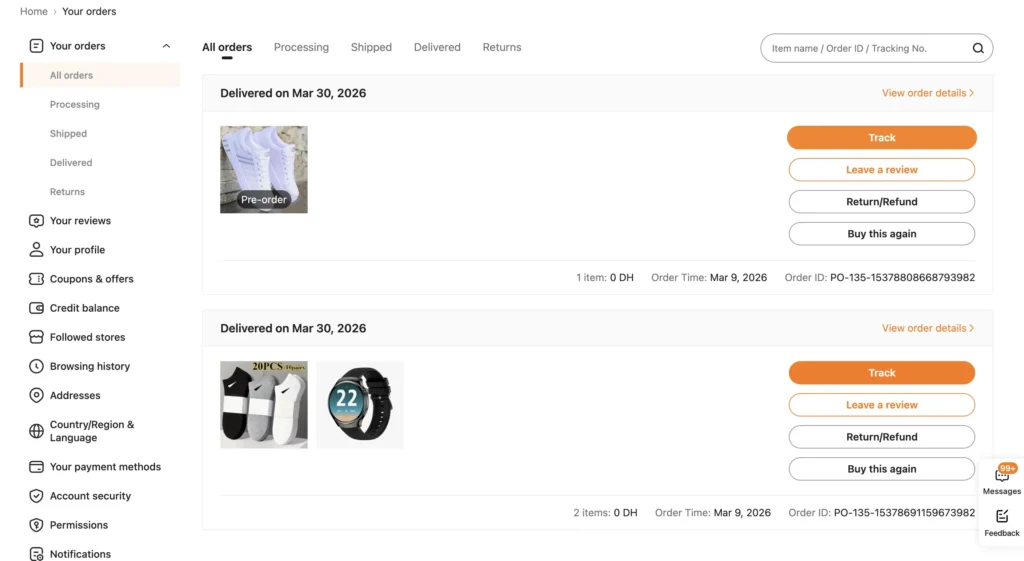
Everything arrived in Midelt, Morocco, in exactly 21 days. The items matched the listings. The checkout page showed real, recognized security badges: PCI DSS, Visa Secure, Mastercard ID Check, and Amex SafeKey. One small thing surprised me: the shoe size tag said “CN 41.” That means EU 40. This detail was on the page, but easy to miss if you read fast. Scroll down to the store reviews section to read the full story here.
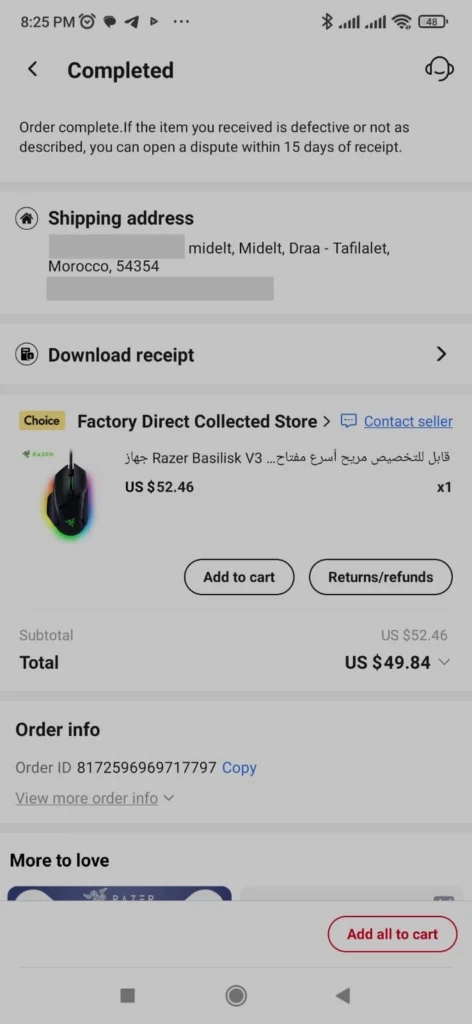
AliExpress. Back in 2023, I ordered a Razer Basilisk V3 gaming mouse. I paid $49.84 in total through PayPal. I had it sent to my home in Midelt. It looked exactly like the photos. It was matte black. It worked great, and honestly, it still works fine today. Scroll down to the store reviews section for the full AliExpress story.
Fiverr. I’ve used this one from both sides. As a seller, I made $156. As an affiliate, $1,790. In my full review, I explain exactly how Fiverr handles payments. Fiverr holds your money until the order is really finished. Scroll down to the store reviews section to see all the details.
Domain names, including a mistake I made.
I’ve bought a few domain names over the years, and one story is worth sharing because it didn’t go perfectly, and that’s exactly what makes it useful.
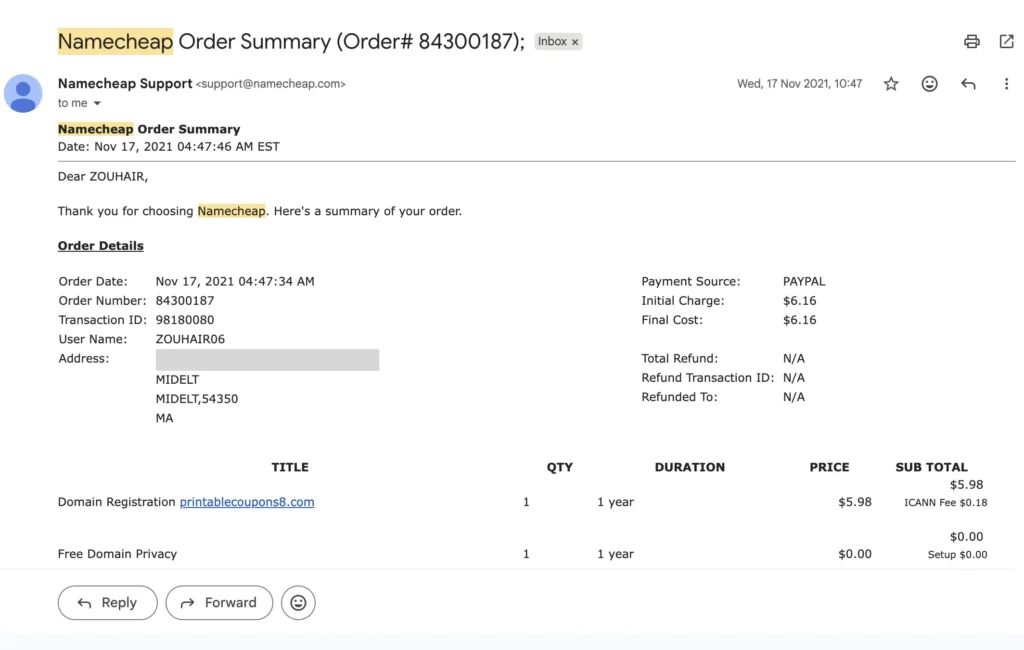
In 2021, I bought printablecoupons8.com through Namecheap and paid $6.16 through PayPal. I renewed it once, then let it go after that.
Later in 2023, I was trying to register a different domain, couponwon.com, and I typed the wrong thing at checkout. I ended up buying couponswon.com by mistake instead, for $9.56 through PayPal.
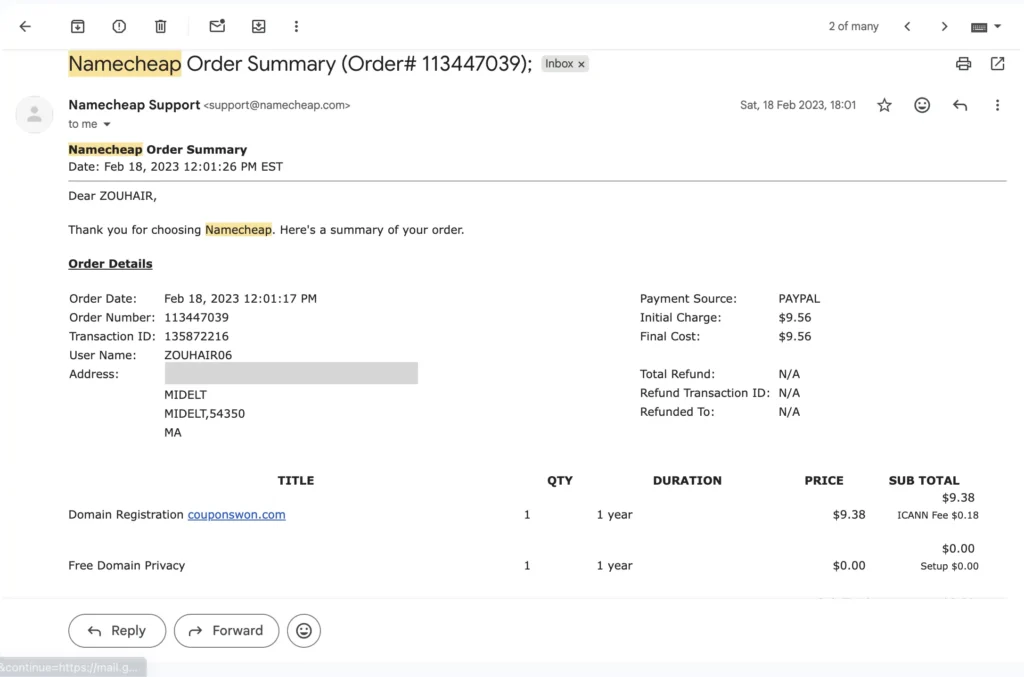
Once I realized what happened, I reached out to Namecheap support. I got refunded for the mistake.
Now, I’ll be honest. This happened a long time ago. I looked for the old email or PayPal record of that refund. I couldn’t find it anywhere. So, I can’t show you a screenshot of the refund itself, just my own memory of it happening, and it happened fast, without a fight.
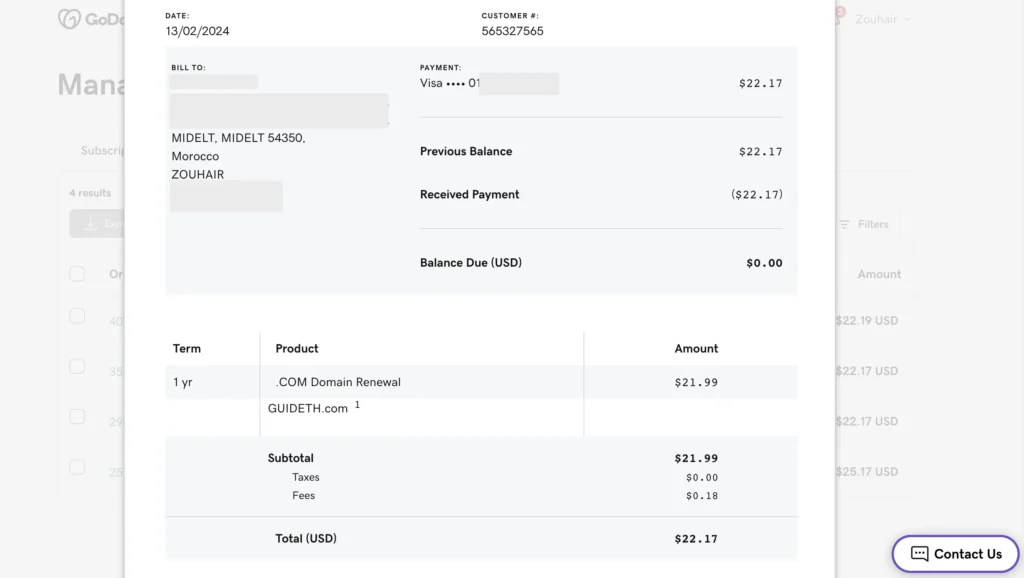
I’m not saying every company fixes mistakes this easily. I’m just saying mine did. Guideth.com is one I still own, and I use it as a coupon site. I renew it through GoDaddy, $22.17 for a one-year .com renewal last time I checked.
Hosting. For hosting, I went with Hostinger. Started on their basic shared plan, moved up to business hosting once things grew, and I’m on cloud hosting now. Nothing dramatic here, and that’s honestly the point. The upgrades happened because I needed more, not because something broke.
What connects all this, the wins and the one mistake: Real order numbers. Real confirmations. And a real company that fixed things when I messed up. That last part matters as much as the smooth purchases. A real business that fixes a real mistake well tells you more about trust than a purchase that went fine on its own.
The Real Downsides of Shopping Online (Not Just Scams)
Here’s something I think a lot of guides skip: scams and fraud are a real, major concern, but they’re honestly not the only downside of shopping online. If I only talked about scams, I’d be giving you an incomplete picture. So let’s cover the rest,
When you shop online, you can’t touch or try items before you buy. No feeling the fabric, no trying on the shoe, no seeing the real color in person. Photos and descriptions help, but they’re not the same as holding the product.
Returns take more effort than walking back into a store.
You usually have to repackage the item, print a label, and wait for a refund to process.
Check this: A June 2018 NPR/Marist poll in the U.S. found that 26% of online shoppers said they never return online purchases, while 65% said they rarely do. Among people who kept something they wanted to return, 58% said the return process was too much of a hassle. You can view the original NPR/Marist poll results here.
So, for some shoppers, the extra steps can make them decide to keep the item instead.
Hidden fees can surprise you at the end.
Shipping, handling, and import taxes on orders from other countries often don’t show up until the last checkout screen. This happens a lot when you buy from an international store.
Your shopping habits get tracked.
Stores track your shopping habits. Yes, they watch what you click, search, and buy, so they can show you more ads and products later. This isn’t unique to any one company; it’s how a lot of e-commerce works now, and it’s worth knowing.
Counterfeit and Stolen Goods: Another Online Risk
It’s not only about getting scammed personally; stolen items can also be resold on online marketplaces. In the U.S., the value of goods stolen through organized retail crime was estimated at $68.8 billion in 2021, equal to about $214 per person in the country. The figure is cited from the U.S. Chamber of Commerce’s Retail Crime Data Center.
Too many choices can be exhausting.
Scrolling through hundreds of nearly identical products, each with its own reviews and price, takes real mental energy. And this is where discount culture comes back into the picture.
The same urgency tactics behind Black Friday, Cyber Monday, and Prime Day are the countdown timers, the flash sales, and the “only 2 left” messages. They exist because they work on human psychology. Not because stores are evil. But because creating a sense of limited time and limited stock makes people buy.
A good deal on something you already needed is great. A “deal” that makes you buy something you never wanted is not a deal at all. Knowing where that pressure comes from historically makes it a lot easier to shop on your own terms during big sales. Not on the store’s terms.
Online shopping is not all good or all bad for the environment. It is mixed. When you skip a car trip to the store, that can lower emissions, especially when deliveries are grouped together efficiently. But more packaging, more returns, and fast, less-efficient individual shipping can push the impact the other way. There is no simple answer here. It depends on the store and how people shop.
I’m not telling you any of this to scare you off online shopping; I clearly still believe in it. It’s my whole business. I just think a page about online shopping safety isn’t being fully honest if it only talks about the scary scam stories and skips the quieter, everyday downsides.
What I Look For in Every Store Review
When I write a full review for a store, here’s exactly what I check:
- Real security signs at checkout.
- Clear buyer protection rules.
- Refund and Return policy, and how it went for me if I really ordered from it.
- Outside reviews from other shoppers, not just the glowing ones sitting on the store’s own page.
Same process, every single time.
My Store Reviews and Safety Guides
I’ve put real time into testing these. Here’s what I found, and where to grab a discount code while you’re there. I’ll keep adding to this list every time I finish testing a new store.
Temu: Is the “Shop Like a Billionaire” App Safe? Temu is huge right now, and a lot of people worry about their privacy on it. My Is Temu Legit or a Scam? review goes through their current security setup in detail. If you decide to shop there, grab one of my Temu coupon codes first.
AliExpress: How to Shop Safely? AliExpress sells almost everything at very low prices directly from China. However, you should always check the seller’s ratings before you buy. My AliExpress Safety Guide for Shoppers walks you through shipping and buyer protection setup. Don’t forget to use an active AliExpress promo code before you check out.
Alibaba: Is It Real for Wholesale Buying? Alibaba is the biggest B2B site in the world, and how safe it feels depends a lot on how you use it. My Is Alibaba Legit? 2026 Review + Real Keyboard Test covers their Trade Assurance program, supplier checks, real landed costs, and a real order I placed from Morocco. Before you buy anything, check my page for active Alibaba coupon codes and deals for new buyers.
DHgate: Bulk Buying Without the Risk. DHgate is great for buying in bulk, but only once you know how to skip the bad sellers. My DHgate legit review shows you exactly how to spot the good, top-rated factories. I also keep a fresh list of daily DHgate discount codes.
Read also: Compare Temu, AliExpress & DHgate for safety and value
Newegg: The Real Story for Tech Buyers. Newegg is a favorite for computer parts, but is it still worth trusting? My honest 2026 Newegg review checks whether their return policy still holds up. Grab a Newegg promo code before you buy new hardware.
Onlymaker: What to Know Before You Buy. Onlymaker makes some genuinely cool custom shoes, but shipping can run slow. My guide on Onlymaker’s quality and shipping tells you exactly what to expect. Use my Onlymaker coupons and deals to get the best price.
Expedia: Is It Safe for Booking Trips?
Travel sites take your payment info, your bookings, and your personal details all at once. So safety matters here as much as normal shopping. My review, “Is Expedia Legit? My Honest 2026 Review & Testing“, explains how the site works. It covers how they protect your booking and how refunds work. It also tells you what to know before you book a flight or hotel. Planning a trip? Check my page for Expedia coupon codes and travel deals
Fiverr: Is the World’s Biggest Freelance Site Real? Fiverr is a popular place to hire freelancers. But two things are good to know before you start. Fiverr takes a 20% fee. And sellers wait 14 days to get paid. In my guide, “Is Fiverr Legit? 2026, My Real Earnings & Proof,” I share my own story as a designer from Midelt, Morocco, including how I earned $156 as a seller and $1,790 as an affiliate. If you’re hiring someone, check my updated list of Fiverr promo codes and first-order discounts first.
More reading: Ultimate Amazon Savings Guide 2026: Tips & Coupons
Is Online Shopping Safe on Phones and Public WiFi?
Shopping on your phone is as safe as shopping on a computer, as long as you’re using the store’s official app and keeping your phone updated. Official apps usually come with an extra layer of security compared to shopping through a browser.
So, make sure to download apps from trusted places like the Apple App Store or Google Play. Don’t ever install one from a link in a text or email; it might look normal to you, but something might be happening in the backend.
Public WiFi can have security risks, but most websites today usually use encryption. The FTC says connecting through public WiFi is usually safe when you’re using a secure website with HTTPS.
Still, don’t type private info on websites that are not secure. If you want to be extra careful, use your own mobile data instead.
Does a VPN help? A VPN locks up your connection, making it much harder for anyone else on that network to see what you’re doing. It can be useful when you truly have no other choice but public WiFi.
But here’s the important part: a VPN only protects your connection. It does nothing to protect you from a scam site itself. You still have to check whether the store is real, VPN or not.
What to Do If You Get Scammed
Don’t panic. Move through these steps in order. One important note before you start: exactly what help you can get, and how fast, depends a lot on your country, your card network, and your bank’s own policy. The steps below are a good place to start, but your details will decide the outcome in your case.
- Call your bank right away. Tell them what happened and ask them to stop the payment if it hasn’t fully gone through yet.
- Freeze your card. Most banking apps let you do this in seconds, so no more money can move.
- Change your passwords. Did you use your normal password on the fake site? Then change it on all your other accounts too. Start with your email and your bank.
- Take screenshots of everything, right away. The web address, the product listing, your order confirmation, any messages you got. You’ll need this if you file a dispute or a report.
- Try the seller first, if it’s a genuine dispute rather than a full-on scam. A lot of problems, an item that never showed up, something that didn’t match the listing, get solved faster this way than jumping straight to your bank.
- If that doesn’t work, contact your bank or PayPal and ask for a dispute or chargeback. Ask them directly what your specific deadline is; it depends on your card network, your bank, and your country, so don’t assume it’s the same everywhere.
- If you’re in the U.S., report it to the FTC at reportfraud.ftc.gov. Click “Report Now,” answer a few simple questions about what kind of scam it was, then add details: how much you paid, how you paid, when it happened. You’ll get a report number and some next steps. If you don’t live in the U.S., your country likely has its own consumer protection office. It handles this the same way. So it’s worth searching online for the one in your country.
- Leave an honest review somewhere public, like Trustpilot or Google. It helps the next person spot the trap before they fall into it too.
| Problem | First step | If it’s not fixed |
|---|---|---|
| Item never showed up | Message the seller directly | Open a dispute or chargeback |
| Item was different than described | Take photos, message the seller | Escalate through the platform’s dispute process |
| Charge you didn’t make | Call your bank right away | Ask for a chargeback and freeze the card |
| Money taken by a fake store | Call your bank right away | Report it to your local consumer protection agency |
| Your info got exposed | Change your passwords now | Turn on 2FA and watch your accounts closely |
Frequently Asked Questions
Mostly fake stores that look real, phishing emails and texts, unsafe public WiFi, and hidden fees that show up late in checkout. Big, well-known stores carry way less of this risk than a site you've never heard of.
It's not only about scams. You can't check the product before it arrives; returns take more effort than an in-store exchange. Your browsing is tracked so you see more ads; hidden fees can pop up late at checkout, and counterfeit or stolen goods do get resold through online marketplaces. In the U.S., the value of goods stolen through organized retail crime was estimated at $68.8 billion in 2021, equal to about $214 per person. All those sales, flash sales, and countdown timers can also push people to buy things they didn't plan on. None of this means skip online shopping; it means go in with your eyes open.
There isn't one single 'biggest' concern; it depends on what you're worried about. Fraud and fake stores are a major concern, and it's the one that costs people the most money directly. But privacy, hidden fees, and counterfeit products also show up constantly in shopper complaints. The honest answer is that scams are one of the biggest concerns, not the only one.
Run through the checklist earlier in this guide: real contact info, a clear return policy, HTTPS, reviews from outside the store's own page, and a price that's close to everywhere else. No single check proves anything by itself, but together they give you a real answer.
Yes, generally, especially with big, well-known stores and the right payment method. The trust comes down to the specific store and how you pay, not 'online shopping' as one giant category.
Based on the FTC's 2024 data, their most recent report with this specific category breakdown. In that report, online shopping issues were the second most reported type of fraud. The first was scammers pretending to be someone else. This ranking is only for the U.S. It is only for that report year. It is not a 2025 or 2026 ranking. Other countries can have different fraud problems.
Type the address in yourself instead of clicking a link, look for a real phone number and address, search the store's name plus 'review' or 'scam,' and check how old the site is with a free tool like Whois.com.
Look for HTTPS in the address bar and normal payment options like Visa, Mastercard, or PayPal. But remember, HTTPS only means your connection is locked up, not that the store itself is honest.
Often, yes, especially if you paid by credit card, but this depends on your country and your specific card or bank. In the U.S., you have the legal right to dispute the charge, and the most you can be held responsible for is $50, though a lot of card companies drop that entirely. Debit cards offer weaker protection in the U.S. too. Outside the U.S., rules vary a lot; some countries have strong chargeback protections for card purchases, others don't, so check your bank's policy and your local consumer protection laws before assuming you're covered the same way.
A digital wallet like Apple Pay or Google Pay, or a regular credit card, tend to offer strong protection in most places. Both keep your real card number away from the store itself. And don't forget the bank app trick: turn off online payments until you need them.
You can't touch or try the item before buying, shipping and hidden fees can add up, returns take more work than walking back into a store, fake stores and counterfeit goods exist, and having too many choices can get overwhelming fast.
No, not at all. It keeps growing even though most everyday purchases around the world still happen inside real, physical stores.
Yes, on most big sites you can check out as a guest, so you don't need to create an account. Guest checkout can mean one less account and password to manage. But the store may still keep your order and payment details. So, don't assume guest checkout means your information isn't stored.
It depends on how careful you are. In-store shopping has zero online scam risk, but you can still get a fake or low-quality product there too. Online shopping gives you buyer protections a lot of physical stores don't offer, plus the ability to compare prices easily. Follow the steps in this guide, and online shopping is often as safe, sometimes even safer.What are the risks of buying online?
What are the negative effects of online shopping?
What is the biggest concern about online shopping?
How do I know if online shopping is safe on a specific site?
Can online shopping be trusted?
What is the biggest problem with online shopping?
How do I check if an online shop is legit?
How do I know if online checkout is secure?
Will my bank refund me if I get scammed online?
What is the best payment method to not get scammed?
What are 5 disadvantages of online shopping?
Is online shopping declining?
Is it safe to shop online without making an account?
Is online shopping safer than shopping in a store?
So, bottom line? Is online shopping safe? Yes. But be a little careful. Use the right payment method, and know what to check before you type in your card number. Follow the checklist. Keep online payments turned off until you need them. Then you are good to go.

Hi, I'm Zouhair, a writer, designer, and the founder of CouponFYI. I built this site in 2023 to help online shoppers get more from their money, from practical shopping tips and honest reviews to the coupon codes and offers you see here.
Before CouponFYI, I spent a couple of years running logo design gigs on Fiverr. That gave me first-hand experience with online pricing, custom offers, sellers, and the way buyers actually make decisions when spending money online. It's also why I don't just publish a coupon, tip, or claim and hope it holds up. I check the information myself, test coupon codes when I can, and use real shopper feedback to fill in the gaps. When something can't be personally confirmed, I'd rather say so than make a promise I can't back up.
I'm based in Morocco, and I personally write and check the content on this site, including the reviews, shopping tips, and coupon information. There's no outsourced writing team behind these pages. It's me doing the research, checking the details, and keeping the information as useful and honest as I can.