
Hi there, this is Zouhair.
First, if you landed here because a CouponFYI code just failed at checkout, I’m really sorry. Some of this is out of my hands, and I know that doesn’t help when you’re standing there watching your total not budge. It is frustrating to watch your total stay frozen when you’re ready to buy.
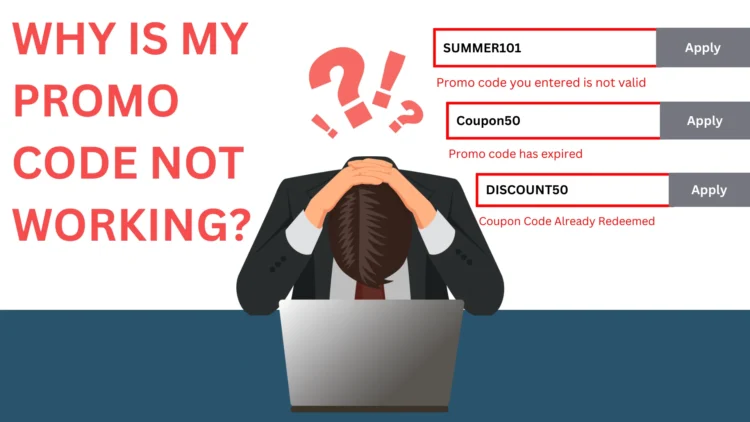
Look, I know how it feels to copy a code, head to the checkout, and paste it. Next, nothing happens. Or worse, you see that little red line: “Promo code you entered is not valid.” And weirdly, that tiny moment stings way more than it should.
Two minutes ago you didn’t even care that much about the discount. Now you’re refreshing the page, checking the code you pasted letter by letter, and wondering what you did wrong.
Turns out, there’s a name for that feeling: “sugrophobia.” In a 2007 paper, psychologists Kathleen Vohs, Roy Baumeister, and Jason Chin used the term to describe the motivation to avoid being a sucker. This study was published in the Review of General Psychology.
The idea is pretty simple. When you think someone else might be getting a better deal than you, it can be surprisingly frustrating. You may start wondering whether you missed something or made the wrong choice.
And that makes sense here. A minute ago, you were happy with the product. Then the code failed, and suddenly you’re thinking, “Why am I paying full price when someone else might be getting 20% off?”
Now you’re not just annoyed about the discount. You’re wondering whether you missed a rule or somehow ended up with the worse deal.
That’s part of why a failed promo code can feel so frustrating.
And that’s exactly what we’re going to figure out here:
Why do promo codes stop working? What does that error message actually mean? And what can you try before giving up on the discount?
Here’s the Big Thing to Know
Look, a promo code isn’t just random letters floating around online for anyone to grab. It’s tied to one specific sale, and every sale has rules. Who can use it, what it works on, when it stops, and how many times it can be used.
When your code fails, it’s not necessarily because it’s fake. In most cases, it’s because your order didn’t match one of those rules.
I test coupon codes myself, regularly, as part of running this site. And honestly, here is the pattern I keep seeing: a failed code is usually a real code.
So, why did it fail? Simply because it’s hitting a rule you can’t see from where you’re standing. Let’s go through what those rules usually are, plus the easiest fixes.
The most common one of all? The code is expired. Most sales have a set window: a weekend deal, a holiday push, or a one-week flash sale. So, once that window closes, your code is dead.
But you might find it keeps floating online anyway, maybe for months, because someone shared it somewhere and nobody ever takes it down. Yes, there are some situations where some stores still honor them anyway; that’s totally up to them. But look, it is rare. If that’s your situation, check my other guide on whether you can use expired coupons or not.
Quick Lookup: What Your Error Message Actually Means
Before we go through the full walkthrough, here’s a fast way to match what your checkout is telling you to what’s probably going on. These won’t be word-for-word the same at every store; retailers phrase things differently, but they’re a solid starting point.
| What checkout says | What it usually means | Check first |
|---|---|---|
| Coupon expired | The promotion’s over on the store’s end | Check the expiration date, then look for a newer code |
| Not applicable / Not valid | Your cart or account doesn’t meet the code’s rules | Check the products, spend amount, and account status |
| Not valid for items in your cart | There’s a product restriction | Remove the excluded item and try again |
| Only available in the app | It’s an app-only promotion | Try the retailer’s app instead of desktop |
| Already redeemed / Already used | The code has already been used or has a usage limit | Check whether you already used it and review the code’s terms |
| Cannot be combined | Another discount is already active | Remove the other discount first |
None of this is guaranteed to match exactly across every retailer. But if you’re staring at an error right now, this is a good place to start.
Step 1: Check for Simple Entry Mistakes (Takes Under a Minute)
Before you assume the store’s blocking you, rule out the boring stuff first. This actually fixes more than you’d think.
- Retype the code slowly. Some codes are case-sensitive, so “SAVE10” and “save10” aren’t always treated the same.
- Watch for lookalike characters. A capital “I” and a lowercase “l” look almost identical. So do a zero and the letter “O.” Read the code character by character.
- Look for a hidden space. Copying and pasting can sneak in an extra space before or after the code without noticing that. If it’s not applying, check if there are any spaces and delete them, or just type the code again by hand instead.
- Make sure you actually clicked “Apply.” It might sound obvious, but look on some sites the discount doesn’t kick in just because you pasted it into the box.
- Check you’re in the right box. A lot of checkout pages have separate boxes for gift cards, store credit, and promo codes. Dropping your code into the wrong one gives you the exact same error as a dead code.
Step 2: Check If You Actually Qualify
If the code you typed in is working but still not applying, this is simply because your order doesn’t meet the rules.
You didn’t spend enough.
A lot of codes only kick in once your cart hits the minimum order amount. Below that line, the code just won’t fire, even if everything else about it checks out.
Something in your cart is left out.
Stores often skip certain items on purpose: new stuff, clearance, or sometimes an entire brand. This trips people up a lot, since it feels like a code should just work on everything. But many times, the popular stuff gets left out on purpose. The store doesn’t need to discount something that’s already selling fine on its own.
The code wasn’t built for you.
It can be only for new customers, email list subscribers, or Loyalty members. Stores use different codes for different goals: one to get a new customer and another to keep an existing customer happy. So, same store, two different codes, two different people in mind. The one you found—if it fails—it is simply because it wasn’t meant for you.
Where you’re shopping from.
Some codes only work in specific countries or regions. If you’re using a VPN, or the store thinks you’re shopping from somewhere else, that alone can be enough to kill the code.
Stacking rules.
This one surprises people the most. If the store is already running an automatic sale across the whole site, most stores won’t let you add a second discount on top of it. Your code gets rejected, not because it’s expired, but because the system won’t combine it with a discount that’s already applied.
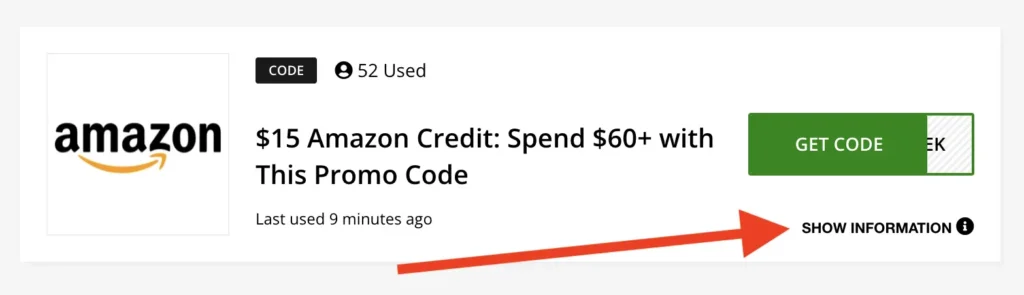
This is exactly why it is very important to check the offer details before you copy anything. Here in CouponFYI cick “Show Information” under every coupon listed; you will find its attached rules.
Step 3: The Code Might Just Be Used Up
Some codes only work once. Stores make a whole batch of them for something like an email blast, and each one only fires a single time. If yours has already been used, whether by you earlier or by whoever it was sent to first, you’ll usually see an error like “code already used” or “already redeemed.”
That’s not a glitch. That code already did its job. Just not for you.
Step 4: Check If It’s a Tech Problem
If you’ve checked everything above and it should work, sometimes it’s not the code at all. It’s your browser or the store’s site acting up.
- Clear your cookies and cache for that site. Then reload the page and rebuild your cart. Old browser data can sometimes get stuck.
- Log out, then log back in. This makes the site re-check your account, which matters if the code depends on you being logged in.
- Try a private or incognito window. Fresh start, no old data getting in the way.
- Try a different browser or device. Just to rule out anything on your end.
- Turn off your VPN, if you’re using one, in case it’s confusing the site about where you are.
If you did all this and are still failing, it might genuinely be something broken on the store’s end, a server hiccup, a bug, or whatever. Just try again in a few minutes before you give up on the code.
Real CouponFYI Checkout Examples
I don’t want to just tell you these rules exist. Let me show you some examples here.
Example 1: The code worked, but not the way you’d expect
Store: Fiverr, Code: Fvrrawinde26
Before the code: package $450.00, service fee $24.75, total $474.75 After the code: package $450.00, promo code -$45.00, service fee $22.28, total $427.28
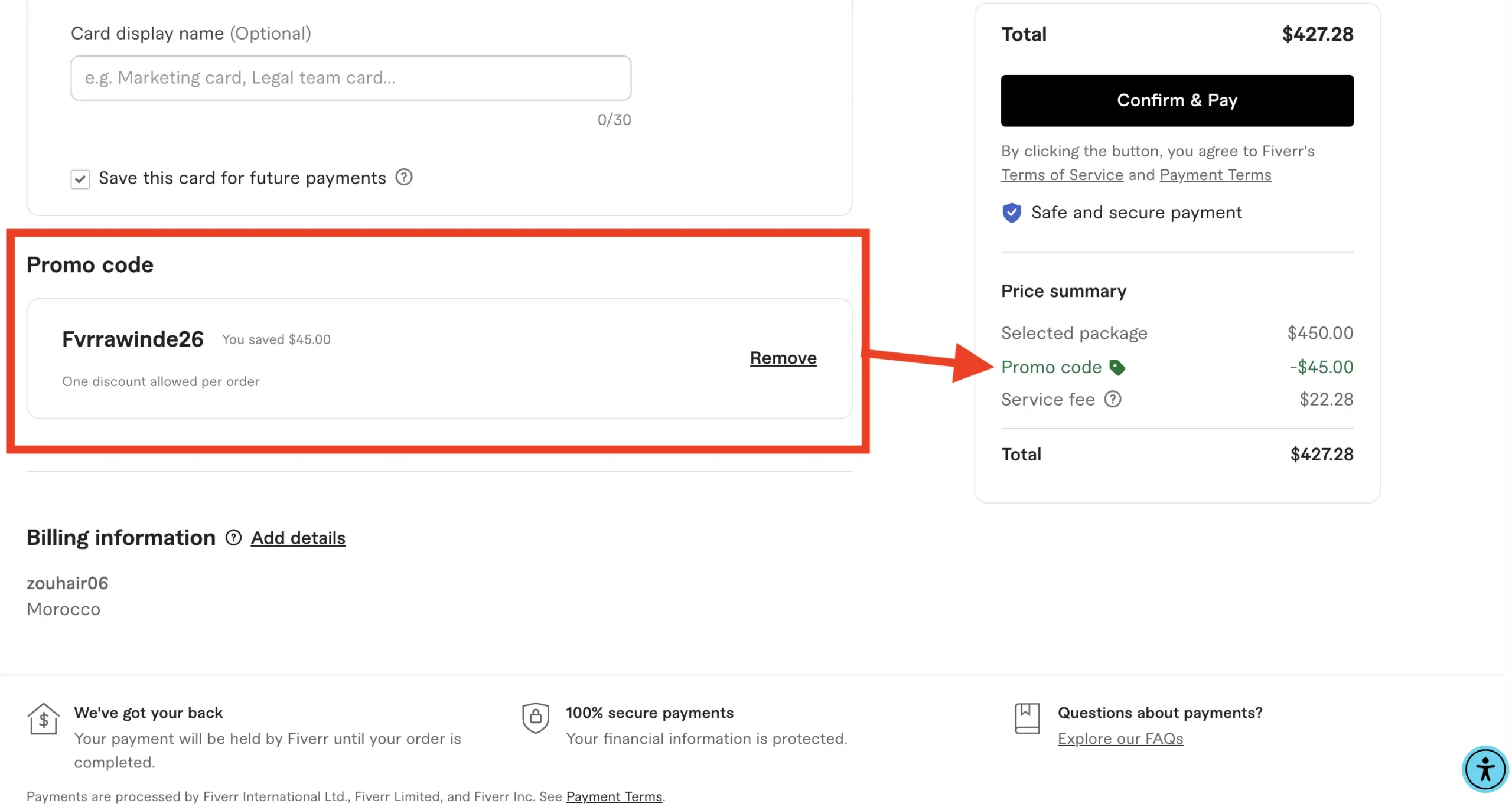
The code took $45 off the package price. That’s exactly 10%, just like it promised. But look closer: the service fee dropped too, from $24.75 to $22.28. Why? Because Fiverr works out that fee based on your price after the discount, not before it.
So the total amount I actually saved ($47.47) ended up a little bigger than the flat 10% you’d expect if you just did the math in your head. This code worked fine. I’m showing it to you so you can see that “10% off” doesn’t always mean you save exactly 10% of the final number.
Example 2: App-only restriction
Store: Temu Code: FAV75424
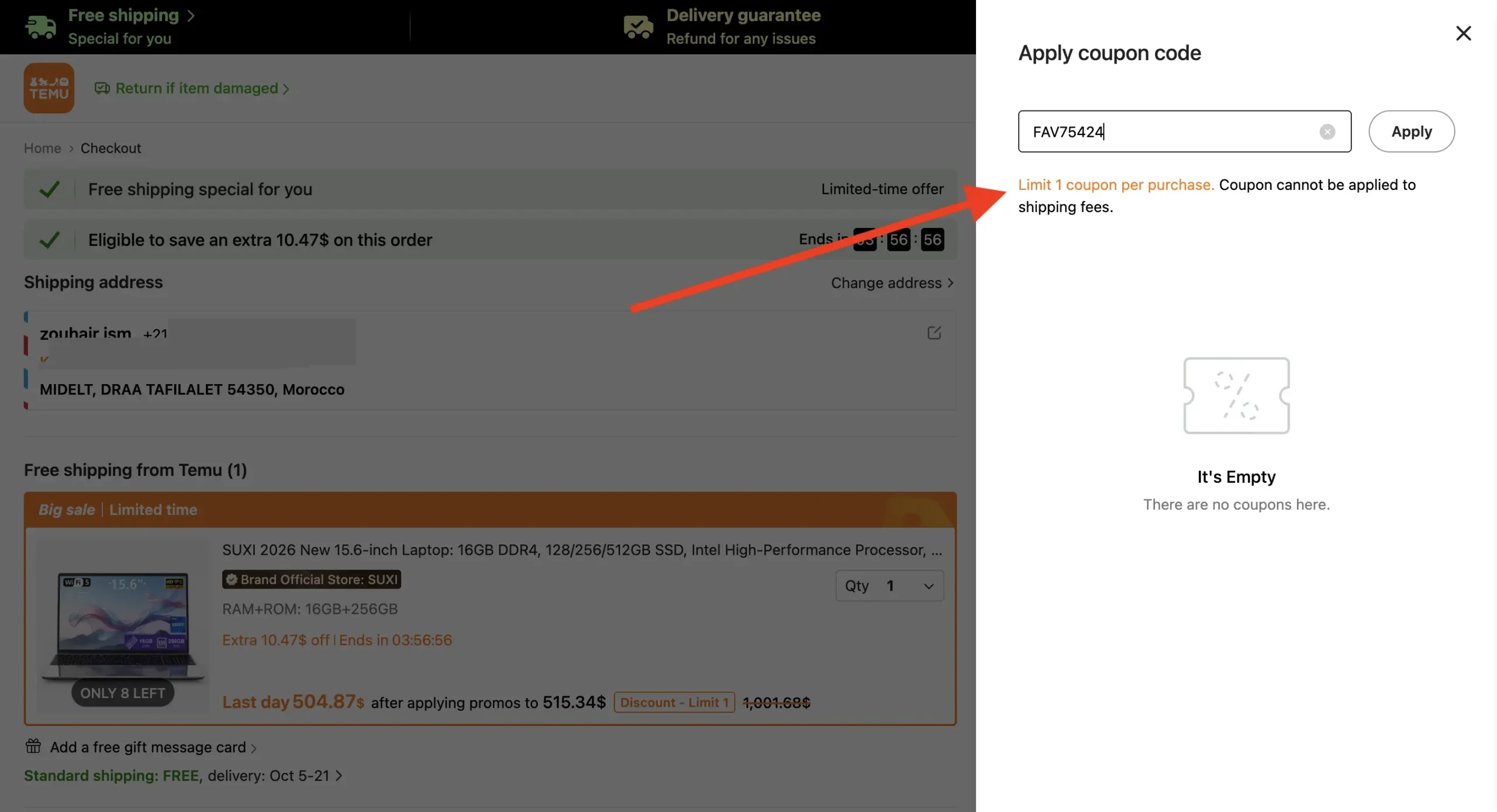
I typed this code into Temu’s website, expecting 40% off. Instead, I got this pop-up:
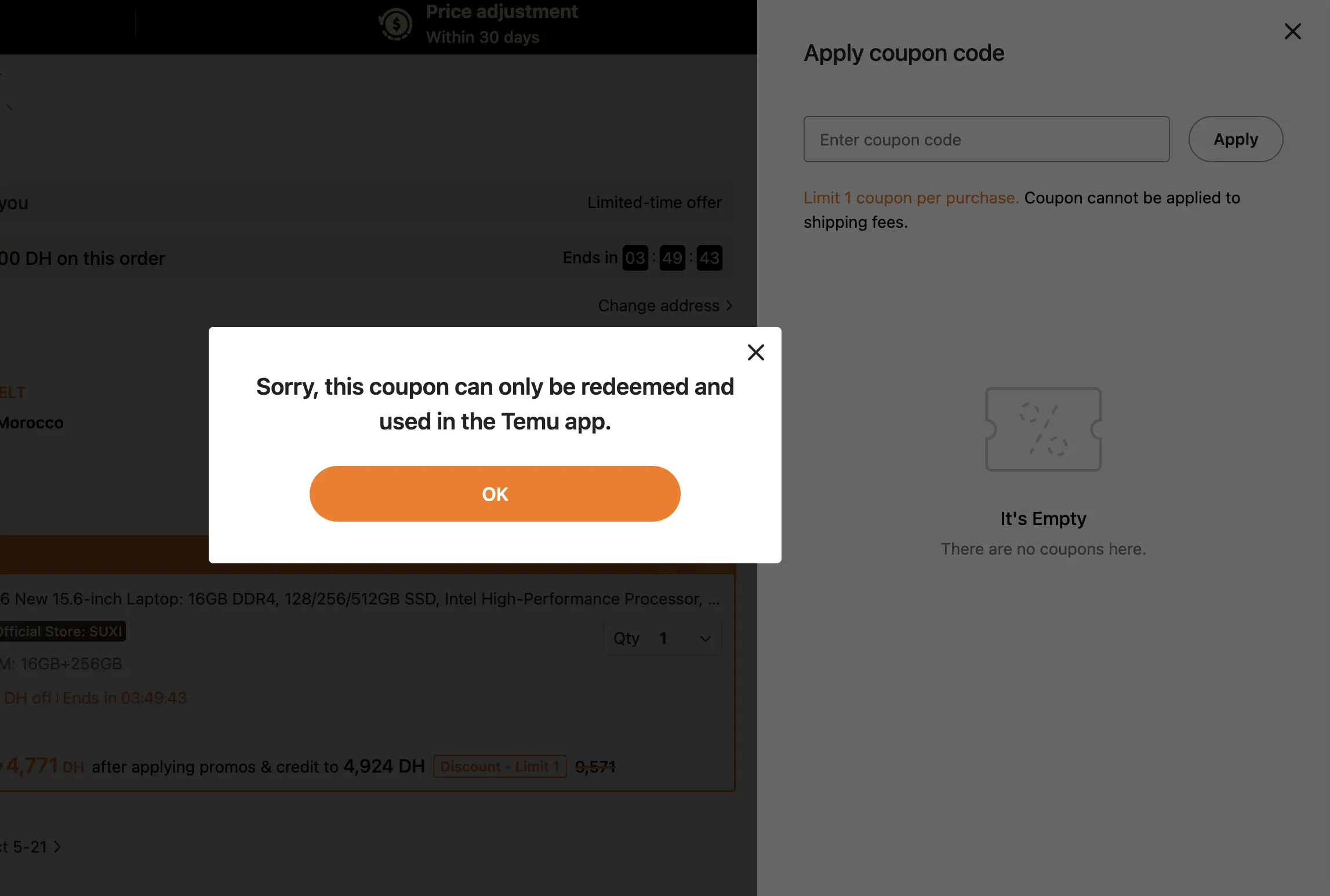
“Sorry, this coupon can only be redeemed and used in the Temu app.” Small print underneath also said only 1 coupon per order, and it can’t be used on shipping.
The code wasn’t broken. I was just using it in the wrong place. Some codes only work inside a store’s app, not on their website. Same code, same rules, different result depending on where you try it.
Example 3: Product restriction
Store: EcoFlow Code: EF3CAFF5
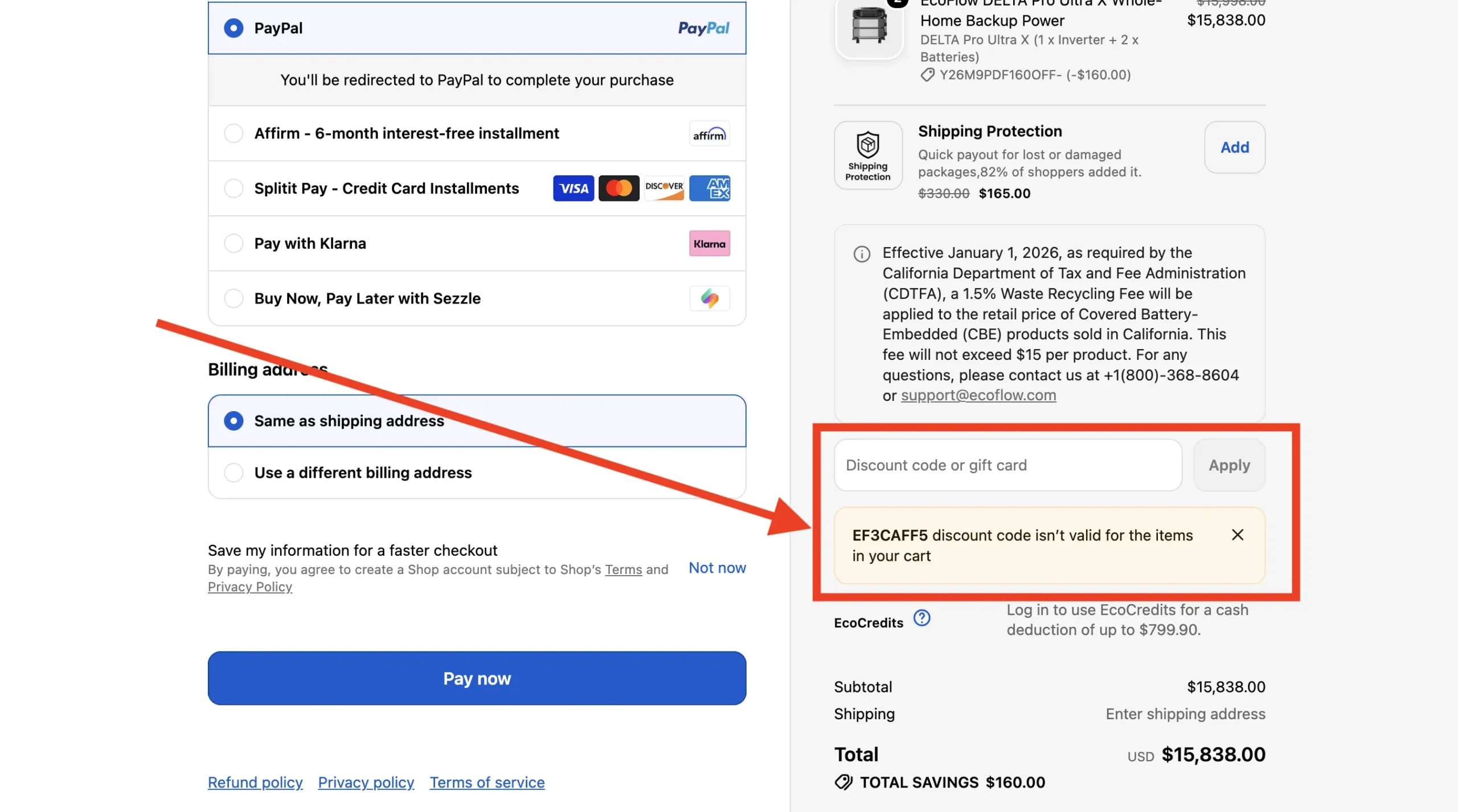
I already had one working code applied to this cart. Then I tried adding EF3CAFF5 on top of it and got this: “EF3CAFF5 discount code isn’t valid for the items in your cart.”
Honestly, I can’t say for sure why. Maybe that code doesn’t apply to this product. Maybe the store just won’t let two codes stack together. The message doesn’t tell me which one it is. Either way, the code was real. It just didn’t work for this specific cart.
Example 4: Flat-out expired
Store: Expedia Code: EXPLOREDR2023
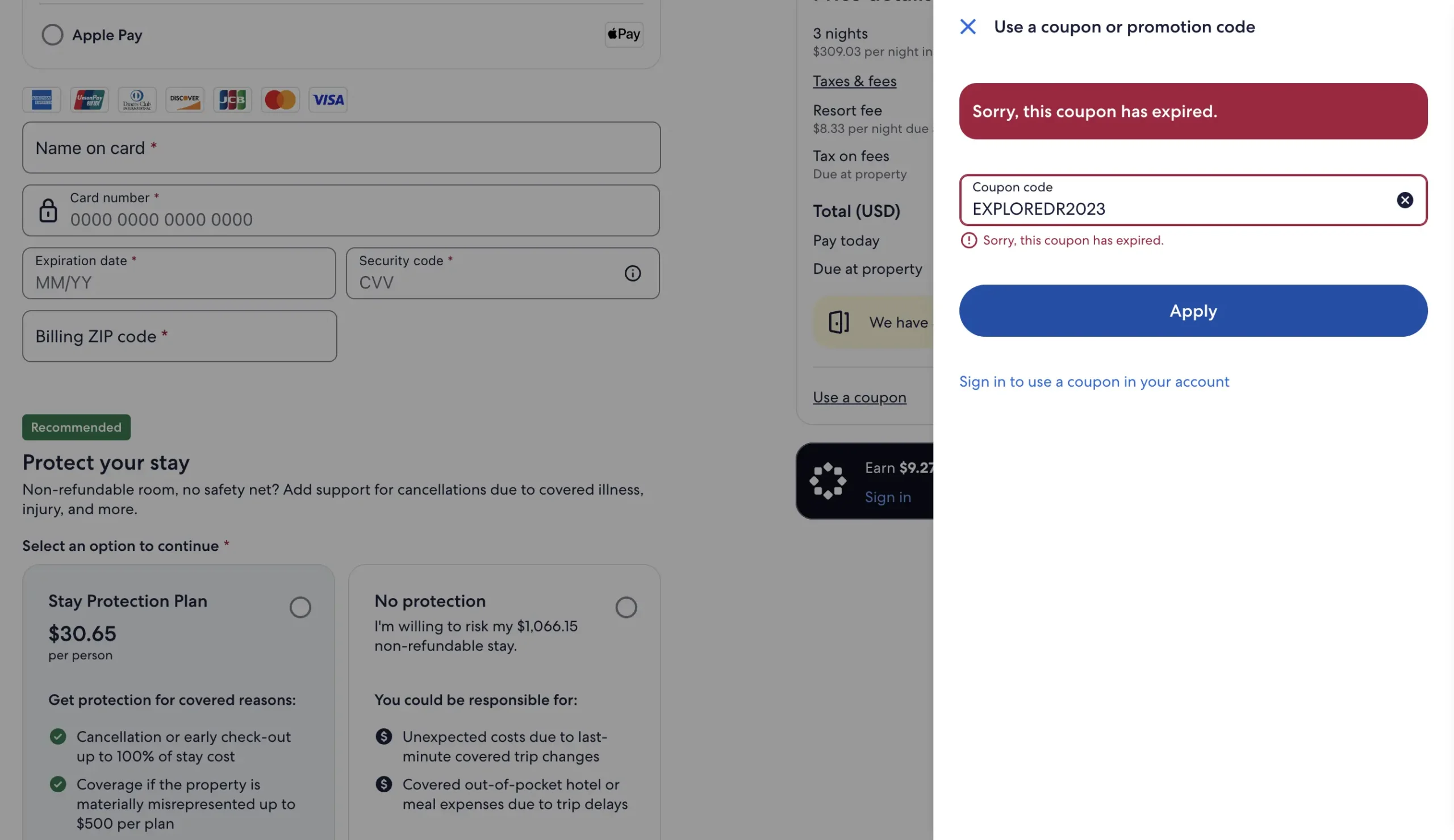
Here’s what was in the cart:
- 3 nights at $309.03 a night: $927.09
- Taxes and fees: $139.06
- Resort fee (paid at the hotel): $25.00
- Tax on that fee (also paid at the hotel): $3.75
- Total: $1,094.90
- Due today: $1,066.15
- Due later at the hotel: $28.75
I typed in the code, hoping for some kind of discount. No luck. Checkout gave me one simple line: “Sorry, this coupon has expired.”
No mystery to solve here. The deal was just over. I’m showing you this one because it’s the easy version, no tricky rule to figure out, no fine print to dig through. Sometimes a code just plain expired, and that’s all there is to it.
Why Does This Work for Someone Else but Not Me?
This confuses a lot of people, so let’s clear it up.
Two people can enter the same code, at the same store, on the same day, and get completely different results. That’s not a bug, and it doesn’t mean either of you did something wrong. It usually comes down to one of these:
- Account. Some codes are tied to a specific account or email.
- Location. Different countries or regions sometimes get different promotions.
- What’s in the cart. One product might qualify, while another might not.
- Cart value. Maybe the other person’s order hit a minimum you didn’t.
- Membership status. Loyalty program or not.
- First order vs. repeat customer. A lot of codes are new-customer-only.
- App vs. website. Like the Temu example above.
- Whether it’s already been used. If someone else redeemed it first, it might already be spent.
So if a code worked for someone else and not you, that’s genuinely not proof you did something wrong. It just means the promotion was built around conditions that happened to match them and not you.
Why Stores Build Codes This Way
Here’s what changes how you shop once you get it.
You have to understand that stores don’t give you promo codes just to be nice. That’s not their real goal. The real point is to get you to do something, like try something new, return to a store you haven’t visited in a while, or buy what you’ve been waiting to get.
That’s why codes expire in 24 hours (urgency). That’s why some are only for loyalty members (makes you feel special). That’s why some are linked to items you were just looking at (pulls you back in). None of this is an accident. It’s all part of the plan.
Once you see it that way, a failed code stops feeling like bad luck. It’s just that you weren’t the person that code was built for.
A Quick Example So This Really Clicks
Say you’ve got $150 headphones in your cart. You find a “20% off” code, paste it in, and it fails. Here’s what could actually be happening:
- The store’s already running a 15% sitewide sale that kicked in the moment you landed on the page. Two discounts don’t stack, so your code gets bounced.
- Those headphones happen to be from a brand the store never discounts, because that brand sells just fine on its own. The code works on everything else, just not that one item.
- The code went out to email subscribers three weeks ago before a new model launched. You found it today, weeks after the sale ended. It just never got taken down.
Three totally different reasons. Same error message. Same “invalid” screen. That’s why trying five more random codes usually wastes more time than just figuring out what actually happened.
Coupon Code vs. Automatic Deal: What’s the Difference?
Quick thing worth knowing, since I list both of them in CouponFYI.
A coupon code is something you have to actually type in or paste at checkout. If you don’t enter it, you don’t get the discount.
An automatic deal is different. The store’s already applied it before you even get to checkout; there’s nothing to type, nothing to paste. You just see the lower price.
Because of that, a deal doesn’t really “fail” the same way a code does. There’s no error message to get, since there’s no field to type into. If an automatic deal doesn’t seem to be applying, that usually means the promotion itself has changed or ended on the store’s side, not that you did something wrong.
Still Stuck? Here’s What to Tell the Store
Went through everything above and it should still be working? Time to reach out to the store directly. Some stuff, a rule that’s wrongly blocking you, a mistake on your account, a real bug, only they can see and fix.
To make that go faster, have this ready:
- The exact error message (screenshot it if you can)
- The code you used
- What’s in your cart
- Your total
- Your order number, if you already tried to check out
Support can usually see stuff you can’t. Whether a rule’s misfiring, whether the code’s tied to another account, or whether something’s just broken. Show up with details, and you’ll get a real answer way faster than “it’s just not working.”
How I Actually Handle This on CouponFYI
This is exactly why I built the site the way I did.
What If a Code Doesn’t Have Any Badge at All?
I don’t slap “verified” on every code and call it a day. When I can test a code myself at checkout, I do, and that earns it a Verified by Editor tag, with a timestamp showing exactly when I checked it. When a shopper tells us a code worked for them recently, that’s a Reported Working tag. And Last Used just shows the last time someone tried it, an honest sign of activity, not a promise.
What I Can Actually Verify (and What I Can’t)
Still, no code is 100% guaranteed to work. A store can change its rules the same day I test something, and there’s nothing I, or any coupon site, can do about that. What I can do is be honest about what I actually know, and update the listing the second I find out something’s changed, instead of letting an old “verified” tag sit there looking like proof.
Want the full breakdown? Here’s how we find, test, and check coupon codes.
Found a Dead Code Here? Let Me Know
If a code from CouponFYI didn’t work for you, don’t just close the tab. Tell me through the Contact Us page: the store, the code, and what happened. That’s genuinely how listings get fixed, and it’s the fastest way to keep this page useful for the next person.
Frequently Asked Questions
It means the sale’s over on the store’s end. Codes don’t run forever; most belong to one specific sale or short campaign. Once that ends, the code stops working, even if you still see it floating online.
Usually not. Most codes, especially welcome deals, only work once per person. Some allow repeat use, but that’s rare, and it should be stated clearly if so.
It usually means something in your cart doesn’t match the code’s rules: not enough spent, an excluded item, or a new-customers-only rule. Check the details, fix your cart, and try again.
Read the fine print before you get your hopes up. Type the code exactly. Keep excluded stuff out of your cart while testing. And if checkout's being weird, try a fresh, logged-in session before giving up.
Because a lot of codes skip certain brands or categories on purpose. One excluded item in your cart, and some checkouts won't apply the code at all until you take it out.
Honestly, it's all over the place. Some last months, some are gone in a day. No fixed rule here, which is exactly why we timestamp every code instead of just saying (active) and leaving it at that.Why does it say “expired”?
Can I use a code more than once?
What does “not applicable” mean?
How do I avoid this next time?
Why does my code work on some stuff but not others?
How long do codes usually last?
At the end of the day, a code failing isn’t some big mystery. Once you know the rules behind it, most of it comes down to timing, who it was made for, or something hiding in the fine print. You didn’t mess up. You just weren’t the person that code was built for, and now you know how to spot the ones that are.

Hi, I'm Zouhair, a writer, designer, and the founder of CouponFYI. I built this site in 2023 to help online shoppers get more from their money, from practical shopping tips and honest reviews to the coupon codes and offers you see here.
Before CouponFYI, I spent a couple of years running logo design gigs on Fiverr. That gave me first-hand experience with online pricing, custom offers, sellers, and the way buyers actually make decisions when spending money online. It's also why I don't just publish a coupon, tip, or claim and hope it holds up. I check the information myself, test coupon codes when I can, and use real shopper feedback to fill in the gaps. When something can't be personally confirmed, I'd rather say so than make a promise I can't back up.
I'm based in Morocco, and I personally write and check the content on this site, including the reviews, shopping tips, and coupon information. There's no outsourced writing team behind these pages. It's me doing the research, checking the details, and keeping the information as useful and honest as I can.